AWS Cloud9 is a cloud-based integrated development environment (IDE) that lets you write, run, and debug your code with just a browser. It includes a code editor, debugger, and terminal. Cloud9 comes prepackaged with essential tools for popular programming languages, including JavaScript, Python, PHP, and more, so you don’t need to install files or configure your development machine to start new projects. Since your Cloud9 IDE is cloud-based, you can work on your projects from your office, home, or anywhere using an internet-connected machine. Cloud9 also provides a seamless experience for developing serverless applications enabling you to easily define resources, debug, and switch between local and remote execution of serverless applications. With Cloud9, you can quickly share your development environment with your team, enabling you to pair program and track each other's inputs in real time.
Benefits
Code with Just a Browser
AWS Cloud9 gives you the flexibility to run your development environment on a managed Amazon EC2 instance or any existing Linux server that supports SSH. This means that you can write, run, and debug applications with just a browser, without needing to install or maintain a local IDE. The Cloud9 code editor and integrated debugger include helpful, time-saving features such as code hinting, code completion, and step-through debugging. The Cloud9 terminal provides a browser-based shell experience enabling you to install additional software, do a git push, or enter commands.

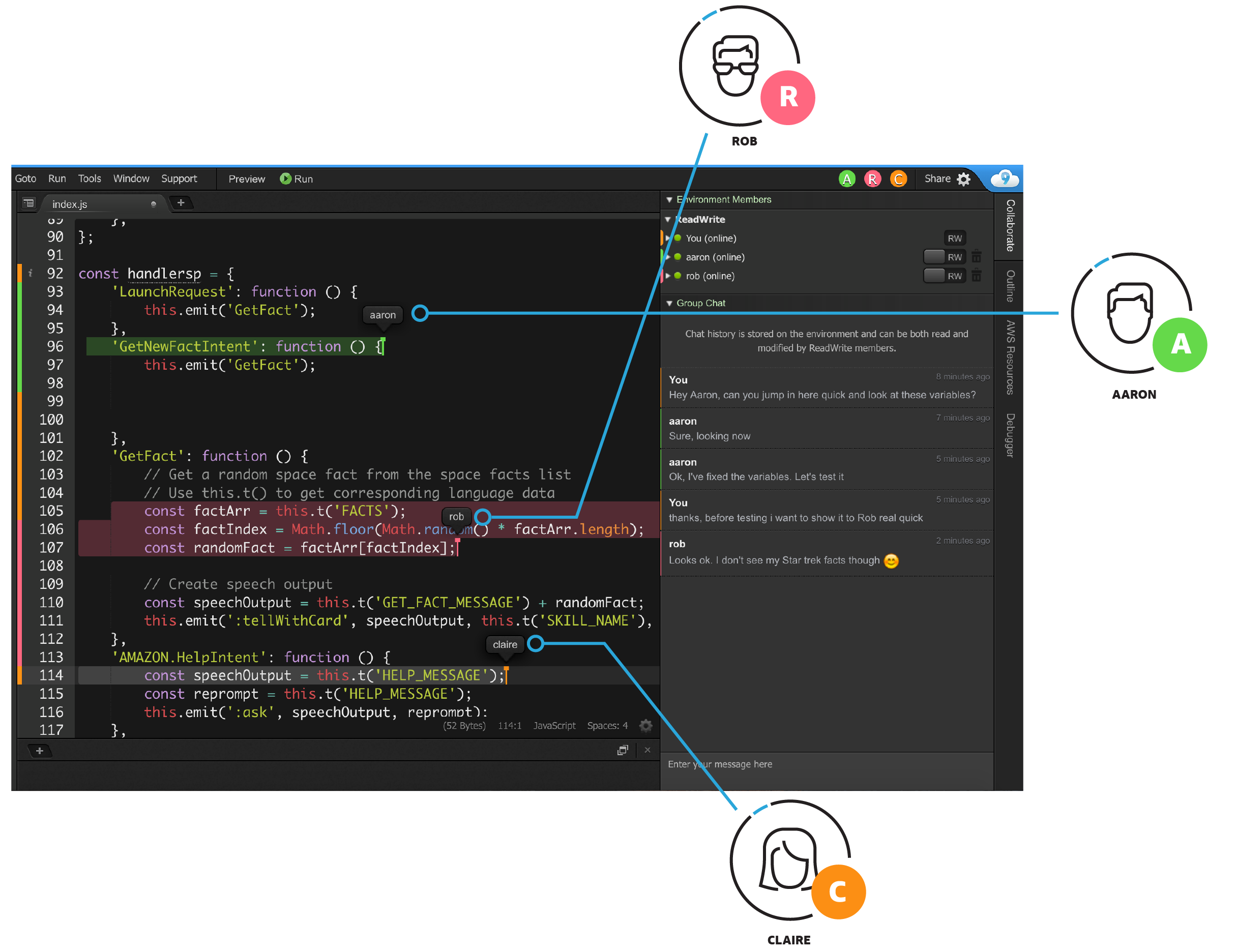
Code Together in Real Time
AWS Cloud9 makes collaborating on code easy. You can share your development environment with your team in just a few clicks and pair program together. While collaborating, your team members can see each other type in real time, and instantly chat with one another from within the IDE.
Build Serverless Applications with Ease
AWS Cloud9 makes it easy to write, run, and debug serverless applications. It preconfigures the development environment with all the SDKs, libraries, and plug-ins needed for serverless development. Cloud9 also provides an environment for locally testing and debugging AWS Lambda functions. This allows you to iterate on your code directly, saving you time and improving the quality of your code.
Direct Terminal Access to AWS
AWS Cloud9 comes with a terminal that includes sudo privileges to the managed Amazon EC2 instance that is hosting your development environment and a preauthenticated AWS Command Line Interface. This makes it easy for you to quickly run commands and directly access AWS services.

Start New Projects Quickly
AWS Cloud9 makes it easy for you to start new projects. Cloud9’s development environment comes prepackaged with tooling for over 40 programming languages, including Node.js, JavaScript, Python, PHP, Ruby, Go, and C++. This enables you to start writing code for popular application stacks within minutes by eliminating the need to install or configure files, SDKs, and plug-ins for your development machine. Because Cloud9 is cloud-based, you can easily maintain multiple development environments to isolate your project’s resources.

Blog posts


Videos
Learn more about AWS Cloud9 features